
One UI 9 is starting to reach Galaxy phones in Canada
Samsung has begun the Canadian rollout of One UI 9, its interface based on Android 17. The rollout started on September 21, 2026, with the Galaxy S26, Galaxy S26+ and Galaxy S26 Ultra.
One UI 9 was already included on Samsung's 2026 foldable phones, including the Galaxy Z Fold8 Ultra, Galaxy Z Fold8 and Galaxy Z Flip8. The September release extends the software to existing devices, beginning with the Galaxy S26 family before expanding gradually.
The update adds new camera editing, daily briefing, translation, document scanning, device-care, privacy and accessibility functions. Availability differs by phone, carrier, language and region, so two Canadian owners of the same model may not receive the download at exactly the same time.
Canadian rollout status at a glance
| Galaxy device | One UI 9 status as of September 25, 2026 |
|---|---|
| Galaxy Z Fold8 Ultra | Shipped with or already received One UI 9 |
| Galaxy Z Fold8 | Shipped with or already received One UI 9 |
| Galaxy Z Flip8 | Shipped with or already received One UI 9 |
| Galaxy S26 | Canadian rollout started September 21 |
| Galaxy S26+ | Canadian rollout started September 21 |
| Galaxy S26 Ultra | Canadian rollout started September 21 |
| Other eligible Galaxy phones and tablets | Gradual expansion planned; exact Canadian timing varies |
Samsung has not published one complete Canadian schedule covering every Galaxy phone and carrier. Lists circulating online may combine expected eligibility, software-support policies and regional schedules. Those can be useful estimates, but they are not the same as a confirmed Canadian release date.
The most reliable confirmation is the update screen on the device itself or a notice from Samsung or the Canadian carrier that supplied it.
What is One UI 9?
One UI is Samsung's software layer for Galaxy phones and tablets. One UI 9 is built on Android 17 and combines the underlying platform changes with Samsung features for Galaxy AI, Camera, Now Brief, Interpreter, Samsung Notes, device support and security. Some apps may receive separate updates through the Galaxy Store or Google Play after installation.
New camera and video tools
My FanCam
My FanCam can select and track a person in a recorded video. The software keeps that person centred and can reframe the footage for a different aspect ratio.
The tool is intended for recordings such as performances, sports and group events where one subject moves around the frame. Processing happens after capture, so the original video remains available.
My FanCam requires a Samsung Account and a suitable person to track. Availability and results vary by video and device.
Improved Document Scan
Document Scan is designed to handle materials that are harder to flatten, including curved book pages and folded corners. It requires less manual correction and adds an improved Finger Eraser for removing fingers that appear while holding a page in place.
Compatible foldables and tablets can also use layouts adapted to larger screens. This can provide more room to review the original and corrected scan before saving it.
Now Brief becomes more customizable
Now Brief collects information such as weather, health data, reminders and daily activity into a summary. In One UI 9, Samsung adds generative and editable cards so users can choose more of what appears.
Cards can be created for categories including health, weather and video. Now Brief still requires a Samsung Account, and the available cards vary by model, country, language and installed apps.
Samsung is also adding Security Brief information to Now Brief. It can surface alerts involving malware, apps installed from unknown sources and permissions that may no longer be needed. The brief is a summary rather than a replacement for the security and privacy pages in Settings.
Now Nudge adds contextual suggestions
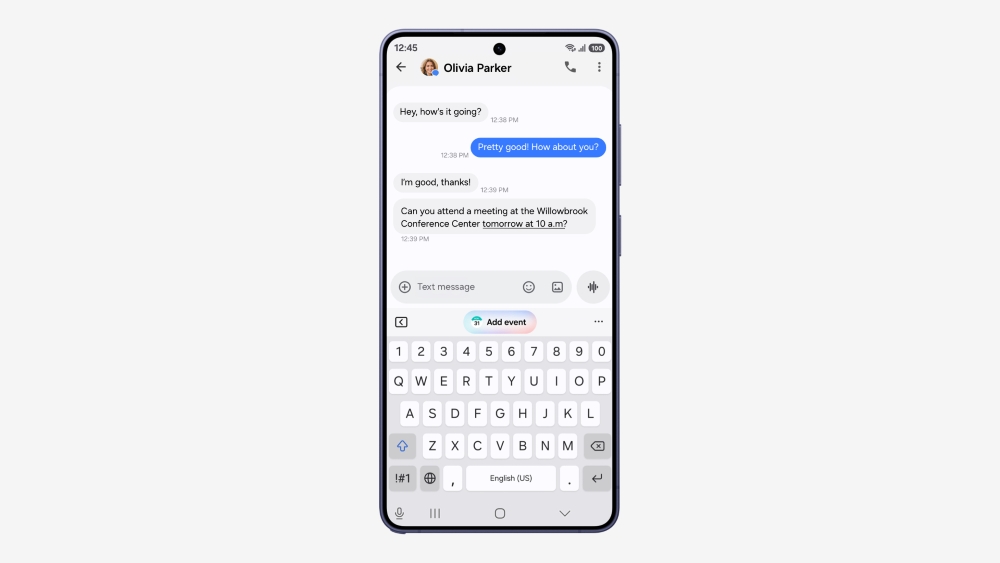
Now Nudge can suggest a next action based on what is happening on the phone. For example, it may show reservation information during a conversation or offer to save a location someone has shared.
Text-based suggestions can work with selected messaging apps, including Samsung Messages, Google Messages and Google Chat. The exact actions depend on installed apps, permissions, language and region.
Interpreter and Voice Recorder changes
Interpreter gains a Thread View that keeps earlier parts of a translated conversation visible. This can make it easier to follow a longer exchange without losing the context of previous statements.
Conversation Mode translates more quickly, while compatible Galaxy Buds provide faster translated playback. Some languages require a downloaded language pack.
Voice Recorder summaries receive a more structured layout. Headings and tables can separate topics and details instead of presenting the entire summary as one block of text. Transcription and summary accuracy still depend on recording quality, speakers and supported languages.
Creative Studio and Samsung Notes
Creative Studio can suggest image-generation ideas related to upcoming events. A birthday in the calendar, for example, may produce a prompt for a themed image or greeting.
Samsung Notes adds decorative tapes and more pen-line styles. Contacts can open Creative Studio directly when creating a profile card, reducing the need to move between apps.
New security and privacy tools
One UI 9 adds several security functions:
- Privacy Alerts use on-device AI to look for unusual or unnecessary background permission access.
- Security Brief summarizes malware, unknown-app and permission warnings in Now Brief.
- High-risk app protection can warn about, block or recommend deleting an app identified through Samsung's security policies.
- Scam Detection expands to Canada and other supported markets, although availability still depends on the device, language and software version.
Privacy Alerts have more limited device support than One UI 9 itself. Samsung specifically lists recent Galaxy S, Z Fold, Z Flip and Tab models for the feature. A phone can receive One UI 9 without receiving every privacy or Galaxy AI function.
Users can review app access under Settings > Security and privacy > Permission manager. Update labels may differ slightly by device.
Warranty and repair information moves into Settings
The new Warranty and Care area brings support information into Settings. Depending on Canadian availability and the device, it can show warranty status, run diagnostics, display repair estimates, manage Samsung Care+ or open service-booking options. Not every option will necessarily appear in Canada on launch day.
Quick Panel and accessibility updates
One UI 9 provides more control over the Quick Panel layout. Brightness, sound and media controls can be resized independently, allowing frequently used controls to take more space.
Accessibility changes include an adjustable Mouse Keys speed, a combined TalkBack package and Text Spotlight. Text Spotlight can show selected text in a larger or clearer floating window. The combined TalkBack package brings Samsung and Google accessibility functions together instead of requiring separate components.
Which older Galaxy phones will receive One UI 9?
Samsung says One UI 9 will gradually expand to other Galaxy devices, but its official rollout release does not provide a complete model-by-model Canadian calendar.
Recent flagships with long update commitments are likely candidates, but eligibility should be confirmed through Samsung's support pages or the device itself. A list of models supporting one feature, such as Privacy Alerts, should not be treated as the full One UI 9 eligibility list.
Carrier testing can also affect timing. A carrier-supplied model may use carrier-specific software and approval processes. An imported Galaxy phone may follow the schedule for its original sales region.
How to check for One UI 9
- Open Settings.
- Select Software update.
- Select Download and install.
- Review the update version and notes before downloading.
- Follow the prompts to restart and install.
If no update appears, the rollout may not have reached that device, firmware or carrier group. Repeated manual checks do not move a phone ahead in Samsung's release queue.
Before installing, connect to Wi-Fi, charge the battery and make a current backup. Samsung Cloud, Google One or a computer running Smart Switch can preserve supported data. It is also sensible to update essential apps through both Google Play and the Galaxy Store.
Should you install One UI 9 immediately?
Most Galaxy S26 owners can install the stable release after backing up their phone. The update includes the September security patch along with the new Android and One UI features.
Some users may prefer to wait briefly if the phone is required for specialized work apps, payment terminals, health accessories or company-managed systems. Business users should follow their organization's device policy. Waiting for a carrier or employer to approve the release does not prevent the phone from continuing to receive the updates currently available for its installed version.
Canadian rollout summary
- One UI 9 is based on Android 17.
- The software debuted on the Galaxy Z Fold8 Ultra, Z Fold8 and Z Flip8.
- The Canadian rollout for the Galaxy S26, S26+ and S26 Ultra began September 21, 2026.
- Other eligible Galaxy devices will follow gradually.
- Features vary by model, carrier, language, account and region.
- The update can be checked under Settings > Software update > Download and install.
Samsung is expanding One UI 9 in stages rather than releasing it to every supported Canadian device at once. Galaxy owners who do not see the update yet should rely on the device's update screen and official Samsung or carrier notices for confirmed availability.
Sources
- Samsung Newsroom Canada: One UI 9 rollout
- Samsung Global Newsroom: One UI 9 official rollout
- Samsung Global Newsroom: One UI 9 beta and Android 17
Rollout and feature information is current as of September 25, 2026.